
Build an Air Quality Monitoring System with ESP32 & Blynk IoT Cloud
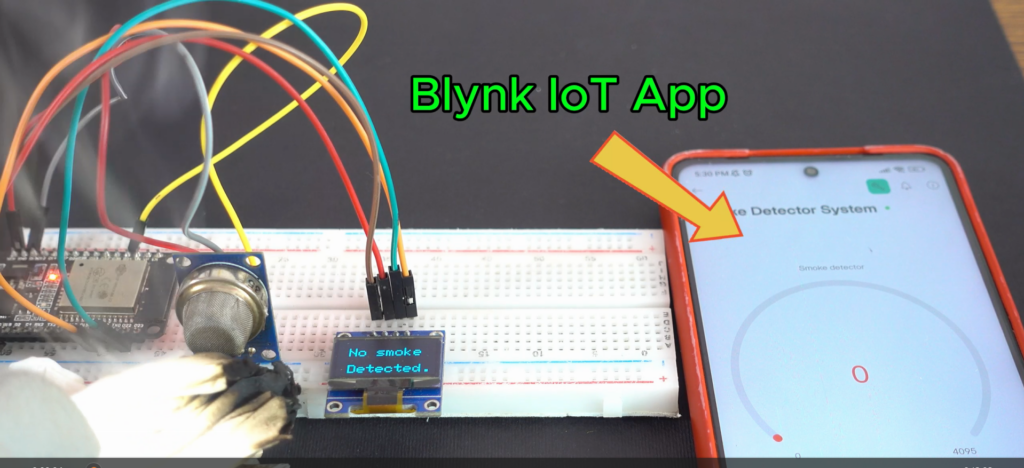
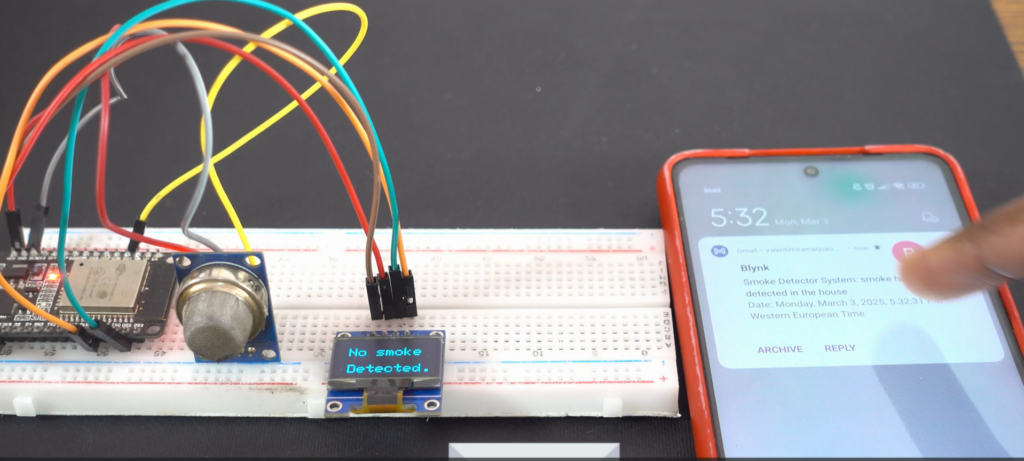
In this project, we build a smart air quality monitoring system using an ESP32 and the Blynk IoT Cloud platform. This system allows you to monitor environmental conditions in real time directly from your smartphone.
The ESP32 reads data from an air quality sensor and sends it wirelessly to the Blynk cloud, where it is displayed on a mobile dashboard. This setup enables remote monitoring, alerts, and data visualization, making it ideal for modern IoT applications.
This project is a great way to learn about IoT systems, cloud connectivity, and environmental sensing.
Components Used
- ESP32 – Main microcontroller with built-in Wi-Fi
- Air Quality Sensor (MQ-135) – Detects gases and air pollution levels
- Blynk IoT Cloud – Platform for remote monitoring and control
- OLED Display (optional) – Displays real-time data locally
- Jumper Wires – For connections
- Breadboard / PCB – For assembling the circuit
Arduino code
#define BLYNK_TEMPLATE_ID "  "
#define BLYNK_TEMPLATE_NAME " "
#define BLYNK_AUTH_TOKEN " "


#include <WiFi.h>
#include <WiFiClient.h>
#include <BlynkSimpleEsp32.h>
#include <Adafruit_GFX.h> // Include the Adafruit GFX library for graphics functions
#include <Adafruit_SSD1306.h> // Include the Adafruit SSD1306 library for the OLED display

// OLED display configuration
#define SCREEN_WIDTH 128 // Define the OLED display width in pixels
#define SCREEN_HEIGHT 64 // Define the OLED display height in pixels
#define OLED_RESET -1 // Define the reset pin for the OLED display (-1 if sharing Arduino reset pin)
Adafruit_SSD1306 display(SCREEN_WIDTH, SCREEN_HEIGHT); // Create an instance of the display object


char auth[] = BLYNK_AUTH_TOKEN;


char ssid[] = "La_Fibre_dOrange_73D3";
char pass[] = "ATN2N95UC7DGKZR99G";
BlynkTimer timer;

const int smokeA0 = 34;
//pins that works with internet
//analogRead( 39 );
//analogRead( 34 );
//analogRead( 35 );
//analogRead( 32 );
//analogRead( 33 );
int sensorThres = 100;

int data;


void sendSensor(){


 Blynk.virtualWrite(V0, data);

  //Serial.println(data);


  if(data > 34){
    //Blynk.email("test@gmail.com", "Alert", "Gas Leakage Detected!");
    Blynk.logEvent("smoke_has_been_detected_in_the_house","smoke has been detected in the house");
    display.clearDisplay();
    display.setTextSize(2);
    display.setCursor(30, 0);
    display.println(F("Smoke"));
    display.setCursor(15, 20);
    display.println(F("has been"));
    display.setCursor(15, 45);
    display.println(F("Detected."));
    display.display();

  }
  else {
    display.clearDisplay();
    display.setTextSize(2);
    display.setCursor(15, 15);
    display.println(F("No smoke"));
    display.setCursor(15, 45);
    display.println(F("Detected."));
    display.display();
}   }
void setup() {

  Serial.begin(9600);
  Blynk.begin(auth, ssid, pass);
  pinMode(smokeA0, INPUT);
  timer.setInterval(2500L, sendSensor);

  // Initialize OLED display
  if (!display.begin(SSD1306_SWITCHCAPVCC, 0x3C)) { // Check if the display initializes correctly with I2C address 0x3C
    Serial.println(F("SSD1306 allocation failed")); // Print error message if initialization fails
    while (true); // Stay in an infinite loop if initialization fails
  }

  display.clearDisplay(); // Clear the display buffer
  display.setTextSize(3); // Set text size to 2
  display.setTextColor(SSD1306_WHITE); // Set text color to white
  display.setCursor(0, 10); // Set cursor position at (0, 10)
  display.println(F("Initializing...")); // Print "Initializing..." on the display
  display.display(); // Update the display with the above settings
  //delay(2000); // Wait for 2 seconds
}

void loop() {
   data = analogRead(smokeA0);
  display.setCursor(15, 45);
  //display.println(data);
  delay(1000);
  Serial.println(data);
  Blynk.run();
  timer.run();
}
Conclusion & Applications
This ESP32-based air quality monitoring system provides a simple and efficient way to track environmental conditions remotely. By integrating with the Blynk IoT Cloud, users can access real-time data anytime and from anywhere.
Applications:
- Home air quality monitoring
- Smart city environmental systems
- Industrial pollution monitoring
- Indoor air safety systems
- IoT-based health monitoring projects
This project can be further expanded with additional sensors, alerts, and automation features, making it a powerful foundation for advanced IoT solutions.