

LAFVIN Smart Robot Car Kit 2WD WiFi ESP32 Camera | Arduino DIY Programming Tutorial
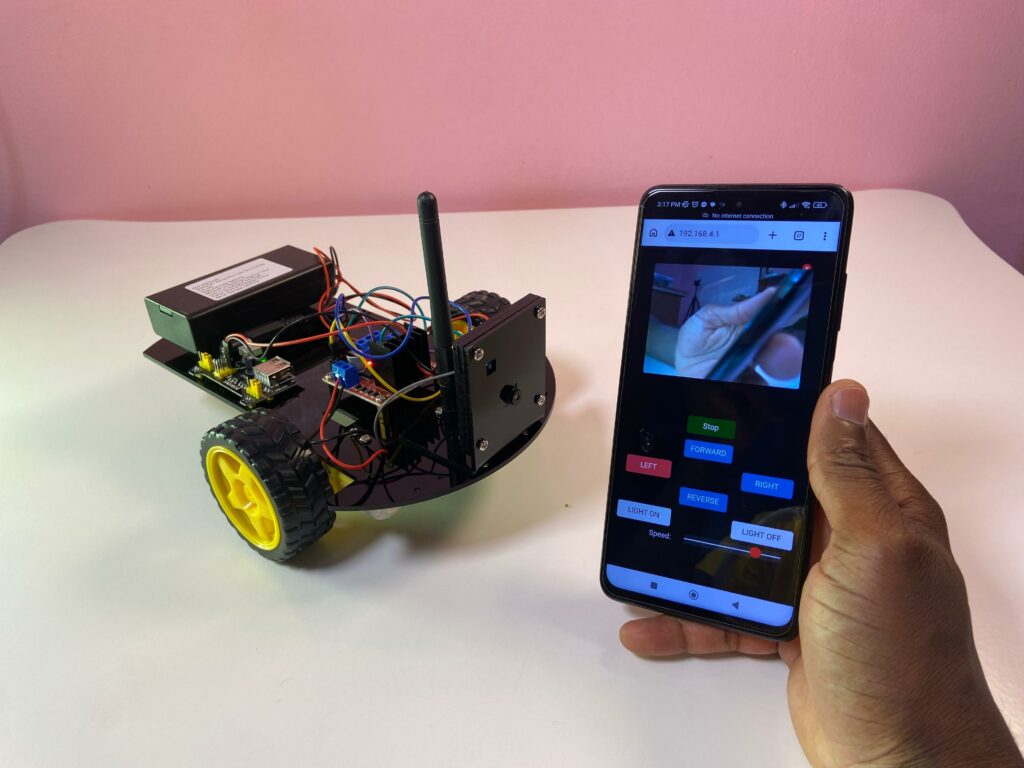
Step into the world of robotics and smart technology with the LAFVIN Smart Robot Car Kit 2WD WiFi ESP32 Camera. In this tutorial, you’ll discover how to build and program your own intelligent robot car using Arduino and ESP32. Equipped with WiFi connectivity and a built-in camera for live video streaming, this DIY kit offers a hands-on way to learn coding, electronics, and remote control systems—all while creating a fun and powerful smart car project.
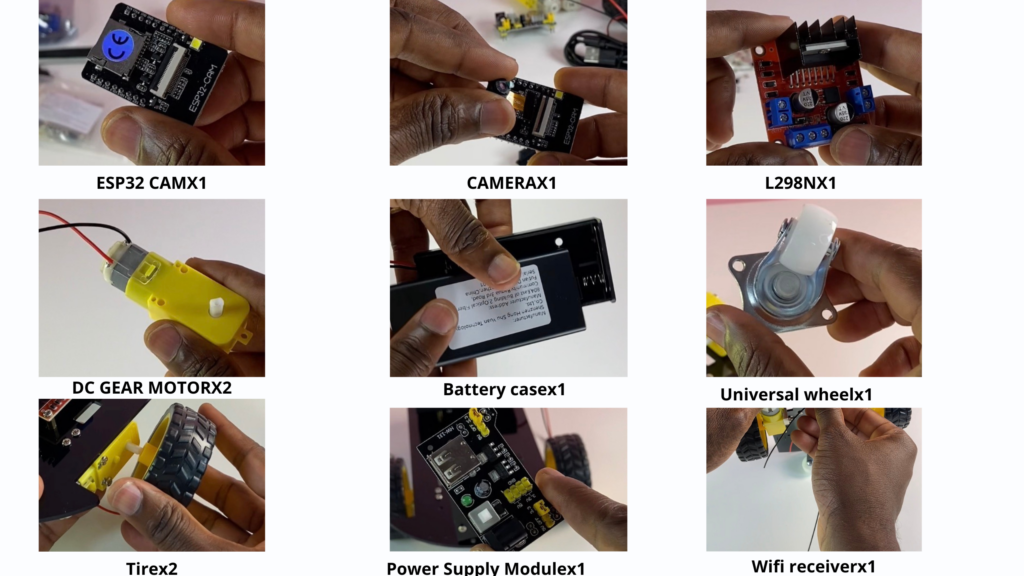
Components used
Video Tutorial
To see how everything works together and learn how to assemble the robot step by step, you can follow the complete video tutorial on my YouTube channel.
Watch the full tutorial on my YouTube channel
Install the Arduino IDE
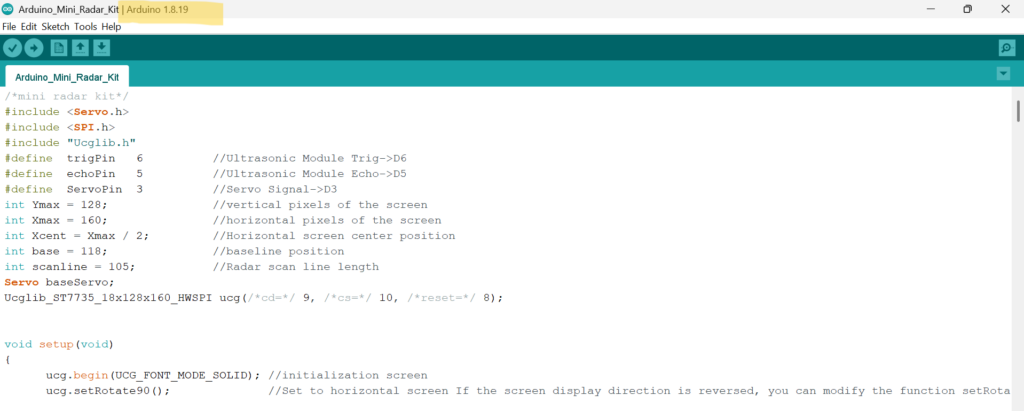
Because Arduino IDE 2.0.X is still in beta, it may cause compatibility issues. It is recommended to use Arduino IDE 1.8.X instead. You can download Arduino IDE 1.8.X from the official link.
If you need help with the installation process, refer to the guide on how to download and install the Arduino IDE.
Install the CH340 driver
Using the ESP32-CAM-MB module simplifies uploading code to the ESP32-CAM. This module uses a CH340 USB-to-serial chip, so you need to install the CH340 driver before uploading any code. Without it, the correct COM port will not appear in the Arduino IDE. If the CH340 driver is already installed on your computer, you can skip this step.
Arduino Code
/*
  ESP32_CAM_Robot_Car
  app_httpd.cpp
  Uses L298N Motor Driver

*/

#include "esp_wifi.h"
#include "esp_camera.h"
#include <WiFi.h>
#include "soc/soc.h"
#include "soc/rtc_cntl_reg.h"

// Setup Access Point Credentials
const char* ssid1 = "ESP32-CAM Robot";
const char* password1 = "1234567890";

extern volatile unsigned int  motor_speed;
extern void robot_stop();
extern void robot_setup();
extern uint8_t robo;
extern volatile unsigned long previous_time;
extern volatile unsigned long move_interval;

#define CAMERA_MODEL_AI_THINKER
#define PWDN_GPIO_NUM     32
#define RESET_GPIO_NUM    -1
#define XCLK_GPIO_NUM      0
#define SIOD_GPIO_NUM     26
#define SIOC_GPIO_NUM     27

#define Y9_GPIO_NUM       35
#define Y8_GPIO_NUM       34
#define Y7_GPIO_NUM       39
#define Y6_GPIO_NUM       36
#define Y5_GPIO_NUM       21
#define Y4_GPIO_NUM       19
#define Y3_GPIO_NUM       18
#define Y2_GPIO_NUM        5
#define VSYNC_GPIO_NUM    25
#define HREF_GPIO_NUM     23
#define PCLK_GPIO_NUM     22

void startCameraServer();

void setup()
{
  WRITE_PERI_REG(RTC_CNTL_BROWN_OUT_REG, 0); // prevent brownouts by silencing them

  Serial.begin(115200);
  Serial.setDebugOutput(true);
  Serial.println();


  camera_config_t config;
  config.ledc_channel = LEDC_CHANNEL_0;
  config.ledc_timer = LEDC_TIMER_0;
  config.pin_d0 = Y2_GPIO_NUM;
  config.pin_d1 = Y3_GPIO_NUM;
  config.pin_d2 = Y4_GPIO_NUM;
  config.pin_d3 = Y5_GPIO_NUM;
  config.pin_d4 = Y6_GPIO_NUM;
  config.pin_d5 = Y7_GPIO_NUM;
  config.pin_d6 = Y8_GPIO_NUM;
  config.pin_d7 = Y9_GPIO_NUM;
  config.pin_xclk = XCLK_GPIO_NUM;
  config.pin_pclk = PCLK_GPIO_NUM;
  config.pin_vsync = VSYNC_GPIO_NUM;
  config.pin_href = HREF_GPIO_NUM;
  config.pin_sscb_sda = SIOD_GPIO_NUM;
  config.pin_sscb_scl = SIOC_GPIO_NUM;
  config.pin_pwdn = PWDN_GPIO_NUM;
  config.pin_reset = RESET_GPIO_NUM;
  config.xclk_freq_hz = 20000000;
  config.pixel_format = PIXFORMAT_JPEG;
  //init with high specs to pre-allocate larger buffers
  if(psramFound()){
    config.frame_size = FRAMESIZE_QVGA;
    config.jpeg_quality = 10;
    config.fb_count = 2;
  } else {
    config.frame_size = FRAMESIZE_QVGA;
    config.jpeg_quality = 12;
    config.fb_count = 1;
  }

  // camera init
  esp_err_t err = esp_camera_init(&config);
  if (err != ESP_OK) {
    Serial.printf("Camera init failed with error 0x%x", err);
    return;
  }

  //drop down frame size for higher initial frame rate
  sensor_t * s = esp_camera_sensor_get();
  s->set_framesize(s, FRAMESIZE_QVGA);
  s->set_vflip(s, 1);
  s->set_hmirror(s, 1);

  WiFi.softAP(ssid1, password1);
  IPAddress myIP = WiFi.softAPIP();
  Serial.print("AP IP address: ");
  Serial.println(myIP);

  startCameraServer();

  ledcSetup(7, 5000, 8);
  ledcAttachPin(4, 7);  //pin4 is LED
  robot_setup();

  for (int i=0;i<5;i++)
  {
    ledcWrite(7,10);  // flash led
    delay(50);
    ledcWrite(7,0);
    delay(50);
  }
  digitalWrite(33,LOW);

  previous_time = millis();
}

void loop() {
  if(robo)
  {
    unsigned long currentMillis = millis();
    if (currentMillis - previous_time >= move_interval) {
      previous_time = currentMillis;
      robot_stop();
      char rsp[32];
      sprintf(rsp,"SPPED: %d",motor_speed);
      Serial.println("Stop");
      robo=0;
    }
  }
  delay(1);
  yield();
}
app_httpd.cpp file
/*
  ESP32_CAM_Robot_Car
  app_httpd.cpp
  Uses L298N Motor Driver

*/

#include "dl_lib_matrix3d.h"
#include <esp32-hal-ledc.h>
#include "esp_http_server.h"
#include "esp_timer.h"
#include "esp_camera.h"
#include "img_converters.h"
#include "Arduino.h"

#define LEFT_M0     13
#define LEFT_M1     12
#define RIGHT_M0    14
#define RIGHT_M1    15

// Define Speed variables
int speed = 255;
int noStop = 0;

//Setting Motor PWM properties
const int freq = 2000;
const int motorPWMChannnel = 8;
const int lresolution = 8;

volatile unsigned int  motor_speed   = 200;
volatile unsigned long previous_time = 0;
volatile unsigned long move_interval = 250;

// Placeholder for functions
void robot_setup();
void robot_stop();
void robot_fwd();
void robot_back();
void robot_left();
void robot_right();
uint8_t robo = 0;


typedef struct {
  httpd_req_t *req;
  size_t len;
} jpg_chunking_t;

#define PART_BOUNDARY "123456789000000000000987654321"
static const char* _STREAM_CONTENT_TYPE = "multipart/x-mixed-replace;boundary=" PART_BOUNDARY;
static const char* _STREAM_BOUNDARY = "\r\n--" PART_BOUNDARY "\r\n";
static const char* _STREAM_PART = "Content-Type: image/jpeg\r\nContent-Length: %u\r\n\r\n";

httpd_handle_t stream_httpd = NULL;
httpd_handle_t camera_httpd = NULL;

static size_t jpg_encode_stream(void * arg, size_t index, const void* data, size_t len) {
  jpg_chunking_t *j = (jpg_chunking_t *)arg;
  if (!index) {
    j->len = 0;
  }
  if (httpd_resp_send_chunk(j->req, (const char *)data, len) != ESP_OK) {
    return 0;
  }
  j->len += len;
  return len;
}

static esp_err_t capture_handler(httpd_req_t *req) {
  camera_fb_t * fb = NULL;
  esp_err_t res = ESP_OK;
  int64_t fr_start = esp_timer_get_time();

  fb = esp_camera_fb_get();
  if (!fb) {
    Serial.println("Camera capture failed");
    httpd_resp_send_500(req);
    return ESP_FAIL;
  }

  httpd_resp_set_type(req, "image/jpeg");
  httpd_resp_set_hdr(req, "Content-Disposition", "inline; filename=capture.jpg");

  size_t out_len, out_width, out_height;
  uint8_t * out_buf;
  bool s;
  {
    size_t fb_len = 0;
    if (fb->format == PIXFORMAT_JPEG) {
      fb_len = fb->len;
      res = httpd_resp_send(req, (const char *)fb->buf, fb->len);
    } else {
      jpg_chunking_t jchunk = {req, 0};
      res = frame2jpg_cb(fb, 80, jpg_encode_stream, &jchunk) ? ESP_OK : ESP_FAIL;
      httpd_resp_send_chunk(req, NULL, 0);
      fb_len = jchunk.len;
    }
    esp_camera_fb_return(fb);
    int64_t fr_end = esp_timer_get_time();
    Serial.printf("JPG: %uB %ums\n", (uint32_t)(fb_len), (uint32_t)((fr_end - fr_start) / 1000));
    return res;
  }

  dl_matrix3du_t *image_matrix = dl_matrix3du_alloc(1, fb->width, fb->height, 3);
  if (!image_matrix) {
    esp_camera_fb_return(fb);
    Serial.println("dl_matrix3du_alloc failed");
    httpd_resp_send_500(req);
    return ESP_FAIL;
  }

  out_buf = image_matrix->item;
  out_len = fb->width * fb->height * 3;
  out_width = fb->width;
  out_height = fb->height;

  s = fmt2rgb888(fb->buf, fb->len, fb->format, out_buf);
  esp_camera_fb_return(fb);
  if (!s) {
    dl_matrix3du_free(image_matrix);
    Serial.println("to rgb888 failed");
    httpd_resp_send_500(req);
    return ESP_FAIL;
  }

  jpg_chunking_t jchunk = {req, 0};
  s = fmt2jpg_cb(out_buf, out_len, out_width, out_height, PIXFORMAT_RGB888, 90, jpg_encode_stream, &jchunk);
  dl_matrix3du_free(image_matrix);
  if (!s) {
    Serial.println("JPEG compression failed");
    return ESP_FAIL;
  }

  int64_t fr_end = esp_timer_get_time();
  return res;
}

static esp_err_t stream_handler(httpd_req_t *req) {
  camera_fb_t * fb = NULL;
  esp_err_t res = ESP_OK;
  size_t _jpg_buf_len = 0;
  uint8_t * _jpg_buf = NULL;
  char * part_buf[64];
  dl_matrix3du_t *image_matrix = NULL;

  static int64_t last_frame = 0;
  if (!last_frame) {
    last_frame = esp_timer_get_time();
  }

  res = httpd_resp_set_type(req, _STREAM_CONTENT_TYPE);
  if (res != ESP_OK) {
    return res;
  }

  while (true) {
    fb = esp_camera_fb_get();
    if (!fb) {
      Serial.println("Camera capture failed");
      res = ESP_FAIL;
    } else {
      {
        if (fb->format != PIXFORMAT_JPEG) {
          bool jpeg_converted = frame2jpg(fb, 80, &_jpg_buf, &_jpg_buf_len);
          esp_camera_fb_return(fb);
          fb = NULL;
          if (!jpeg_converted) {
            Serial.println("JPEG compression failed");
            res = ESP_FAIL;
          }
        } else {
          _jpg_buf_len = fb->len;
          _jpg_buf = fb->buf;
        }
      }
    }
    if (res == ESP_OK) {
      size_t hlen = snprintf((char *)part_buf, 64, _STREAM_PART, _jpg_buf_len);
      res = httpd_resp_send_chunk(req, (const char *)part_buf, hlen);
    }
    if (res == ESP_OK) {
      res = httpd_resp_send_chunk(req, (const char *)_jpg_buf, _jpg_buf_len);
    }
    if (res == ESP_OK) {
      res = httpd_resp_send_chunk(req, _STREAM_BOUNDARY, strlen(_STREAM_BOUNDARY));
    }
    if (fb) {
      esp_camera_fb_return(fb);
      fb = NULL;
      _jpg_buf = NULL;
    } else if (_jpg_buf) {
      free(_jpg_buf);
      _jpg_buf = NULL;
    }
    if (res != ESP_OK) {
      break;
    }
    int64_t fr_end = esp_timer_get_time();
    int64_t frame_time = fr_end - last_frame;
    last_frame = fr_end;
    frame_time /= 1000;
    Serial.printf("MJPG: %uB %ums (%.1ffps)\n",
                  (uint32_t)(_jpg_buf_len),
                  (uint32_t)frame_time, 1000.0 / (uint32_t)frame_time
                 );
  }

  last_frame = 0;
  return res;
}

enum state {fwd, rev, stp};
state actstate = stp;

static esp_err_t cmd_handler(httpd_req_t *req)
{
  char*  buf;
  size_t buf_len;
  char variable[32] = {0,};
  char value[32] = {0,};

  buf_len = httpd_req_get_url_query_len(req) + 1;
  if (buf_len > 1) {
    buf = (char*)malloc(buf_len);
    if (!buf) {
      httpd_resp_send_500(req);
      return ESP_FAIL;
    }
    if (httpd_req_get_url_query_str(req, buf, buf_len) == ESP_OK) {
      if (httpd_query_key_value(buf, "var", variable, sizeof(variable)) == ESP_OK &&
          httpd_query_key_value(buf, "val", value, sizeof(value)) == ESP_OK) {
      } else {
        free(buf);
        httpd_resp_send_404(req);
        return ESP_FAIL;
      }
    } else {
      free(buf);
      httpd_resp_send_404(req);
      return ESP_FAIL;
    }
    free(buf);
  } else {
    httpd_resp_send_404(req);
    return ESP_FAIL;
  }

  int val = atoi(value);
  sensor_t * s = esp_camera_sensor_get();
  int res = 0;

// Look at values within URL to determine function
  if (!strcmp(variable, "framesize"))
  {
    Serial.println("framesize");
    if (s->pixformat == PIXFORMAT_JPEG) res = s->set_framesize(s, (framesize_t)val);
  }
  else if (!strcmp(variable, "quality"))
  {
    Serial.println("quality");
    res = s->set_quality(s, val);
  }
  else if (!strcmp(variable, "flash"))
  {
    ledcWrite(7, val);
  }
  else if (!strcmp(variable, "flashoff"))
  {
    ledcWrite(7, val);
  }
  else if (!strcmp(variable, "speed"))
  {
    if      (val > 255) val = 255;
    else if (val <   0) val = 0;
    speed = val;
    //ledcWrite(8, speed);
    //ledcWrite(9, speed);
  }
  else if (!strcmp(variable, "nostop"))
  {
    noStop = val;
  }
  else if (!strcmp(variable, "car")) {
    if (val == 1) {
      Serial.println("Forward");
      robot_fwd();
      robo = 1;
    }
    else if (val == 2) {
      Serial.println("TurnLeft");
      robot_left();
      robo = 1;
    }
    else if (val == 3) {
      Serial.println("Stop");
      robot_stop();
    }
    else if (val == 4) {
      Serial.println("TurnRight");
      robot_right();
      robo = 1;
    }
    else if (val == 5) {
      Serial.println("Backward");
      robot_back();
      robo = 1;
    }
    if (noStop != 1)
    {

    }
  }
  else
  {
    Serial.println("variable");
    res = -1;
  }

  if (res) {
    return httpd_resp_send_500(req);
  }

  httpd_resp_set_hdr(req, "Access-Control-Allow-Origin", "*");
  return httpd_resp_send(req, NULL, 0);
}

static esp_err_t status_handler(httpd_req_t *req) {
  static char json_response[1024];

  sensor_t * s = esp_camera_sensor_get();
  char * p = json_response;
  *p++ = '{';

  p += sprintf(p, "\"framesize\":%u,", s->status.framesize);
  p += sprintf(p, "\"quality\":%u,", s->status.quality);
  *p++ = '}';
  *p++ = 0;
  httpd_resp_set_type(req, "application/json");
  httpd_resp_set_hdr(req, "Access-Control-Allow-Origin", "*");
  return httpd_resp_send(req, json_response, strlen(json_response));
}

static const char PROGMEM INDEX_HTML[] = R"rawliteral(
<!doctype html>
<html>
    <head>
        <meta charset="utf-8">
        <meta name="viewport" content="width=device-width,initial-scale=1">
        <title>ESP32 CAM Robot</title>
        <style>
    body {
        font-family: Arial, Helvetica, sans-serif;
        background: #181818;
        color: #efefef;
        font-size: 16px;
    }
    h2 {
        font-size: 18px;
    }
    section.main {
        display: flex;
    }
    #menu,
    section.main {
        flex-direction: column;
    }
    #menu {
        display: none;
        flex-wrap: nowrap;
        min-width: 340px;
        background: #363636;
        padding: 8px;
        border-radius: 4px;
        margin-top: 1px;
        margin-right: 10px;
    }
    #content {
        display: flex;
        flex-wrap: wrap;
        align-items: stretch;
    }
    figure {
        padding: 0;
        margin: 0;
        -webkit-margin-before: 0;
        margin-block-start: 0;
        -webkit-margin-after: 0;
        margin-block-end: 0;
        -webkit-margin-start: 0;
        margin-inline-start: 0;
        -webkit-margin-end: 0;
        margin-inline-end: 0;
    }
    figure img {
        display: block;
        width: 100%;
        height: auto;
        border-radius: 4px;
        margin-top: 15px;
    }
    @media (min-width: 800px) and (orientation: landscape) {
        #content {
            display: flex;
            flex-wrap: nowrap;
            align-items: stretch;
        }
        figure img {
            display: block;
            max-width: 100%;
            max-height: calc(100vh - 40px);
            width: auto;
            height: auto;
        }
        figure {
            padding: 0;
            margin: 0;
            -webkit-margin-before: 0;
            margin-block-start: 0;
            -webkit-margin-after: 0;
            margin-block-end: 0;
            -webkit-margin-start: 0;
            margin-inline-start: 0;
            -webkit-margin-end: 0;
            margin-inline-end: 0;
        }
    }
    section #buttons {
        display: flex;
        flex-wrap: nowrap;
        justify-content: space-between;
    }
    #nav-toggle {
        cursor: pointer;
        display: block;
    }
    #nav-toggle-cb {
        outline: 0;
        opacity: 0;
        width: 0;
        height: 0;
    }
    #nav-toggle-cb:checked + #menu {
        display: flex;
    }
    .input-group {
        display: flex;
        flex-wrap: nowrap;
        line-height: 22px;
        margin: 5px 0;
    }
    .input-group > label {
        display: inline-block;
        padding-right: 10px;
        min-width: 47%;
    }
    .input-group input,
    .input-group select {
        flex-grow: 1;
    }
    .range-max,
    .range-min {
        display: inline-block;
        padding: 0 5px;
    }
    button {
        display: block;
        margin: 5px;
        padding: 5px 12px;
        border: 0;
        line-height: 28px;
        cursor: pointer;
        color: #fff;
        background: #035806;
        border-radius: 5px;
        font-size: 16px;
        outline: 0;
        width: 100px;

    }
    .button2 {background-color: #008CBA; width: 100px;} /* Blue */
    .button3 {background-color: #f44336; width: 100px;} /* Red */
    .button4 {background-color: #e7e7e7; color: black; width: 120px;} /* Gray */
    .button5 {background-color: #555555; width: 100px;} /* Black */
    .button6 {visibility: hidden; width: 100px;} /* Black */


    button:hover {
        background: #ff494d;
    }
    button:active {
        background: #f21c21;
    }
    button.disabled {
        cursor: default;
        background: #a0a0a0;
    }
    input[type="range"] {
        -webkit-appearance: none;
        width: 80%;
        height: 22px;
        background: #363636;
        cursor: pointer;
        margin: 0;
    }
    input[type="range"]:focus {
        outline: 0;
    }
    input[type="range"]::-webkit-slider-runnable-track {
        width: 80%;
        height: 2px;
        cursor: pointer;
        background: #efefef;
        border-radius: 0;
        border: 0 solid #efefef;
    }
    input[type="range"]::-webkit-slider-thumb {
        border: 1px solid rgba(0, 0, 30, 0);
        height: 22px;
        width: 22px;
        border-radius: 50px;
        background: #ff3034;
        cursor: pointer;
        -webkit-appearance: none;
        margin-top: -11.5px;
    }
    input[type="range"]:focus::-webkit-slider-runnable-track {
        background: #efefef;
    }
    input[type="range"]::-moz-range-track {
        width: 80%;
        height: 2px;
        cursor: pointer;
        background: #efefef;
        border-radius: 0;
        border: 0 solid #efefef;
    }
    input[type="range"]::-moz-range-thumb {
        border: 1px solid rgba(0, 0, 30, 0);
        height: 22px;
        width: 22px;
        border-radius: 50px;
        background: #ff3034;
        cursor: pointer;
    }
    input[type="range"]::-ms-track {
        width: 80%;
        height: 2px;
        cursor: pointer;
        background: 0 0;
        border-color: transparent;
        color: transparent;
    }
    input[type="range"]::-ms-fill-lower {
        background: #efefef;
        border: 0 solid #efefef;
        border-radius: 0;
    }
    input[type="range"]::-ms-fill-upper {
        background: #efefef;
        border: 0 solid #efefef;
        border-radius: 0;
    }
    input[type="range"]::-ms-thumb {
        border: 1px solid rgba(0, 0, 30, 0);
        height: 22px;
        width: 22px;
        border-radius: 50px;
        background: #ff3034;
        cursor: pointer;
        height: 2px;
    }
    input[type="range"]:focus::-ms-fill-lower {
        background: #efefef;
    }
    input[type="range"]:focus::-ms-fill-upper {
        background: #363636;
    }
    .switch {
        display: block;
        position: relative;
        line-height: 22px;
        font-size: 16px;
        height: 22px;
    }
    .switch input {
        outline: 0;
        opacity: 0;
        width: 0;
        height: 0;
    }
    .slider {
        width: 50px;
        height: 22px;
        border-radius: 22px;
        cursor: pointer;
        background-color: grey;
    }
    .slider,
    .slider:before {
        display: inline-block;
        transition: 0.4s;
    }
    .slider:before {
        position: relative;
        content: "";
        border-radius: 50%;
        height: 16px;
        width: 16px;
        left: 4px;
        top: 3px;
        background-color: #fff;
    }
    input:checked + .slider {
        background-color: #ff3034;
    }
    input:checked + .slider:before {
        -webkit-transform: translateX(26px);
        transform: translateX(26px);
    }
    select {
        border: 1px solid #363636;
        font-size: 14px;
        height: 22px;
        outline: 0;
        border-radius: 5px;
    }
    .image-container {
        position: absolute;
        top: 150px;
        left: 50%;
        margin-right: -50%;
        transform: translate(-50%, -50%);
        min-width: 160px;

    }

    .control-container {
        position: relative;
        top: 450px;
        left: 50%;
        margin-right: -50%;
        transform: translate(-50%, -50%);


    }

    .slider-container {
        position: relative;
        top: 550px;
        left: auto;
        margin-right: auto;


    }
    .close {
        position: absolute;
        right: 5px;
        top: 5px;
        background: #ff3034;
        width: 16px;
        height: 16px;
        border-radius: 100px;
        color: #fff;
        text-align: center;
        line-height: 18px;
        cursor: pointer;
    }
    .hidden {
        display: none;
    }
    .rotate90 {
        -webkit-transform: rotate(180deg);
        -moz-transform: rotate(180deg);
        -o-transform: rotate(180deg);
        -ms-transform: rotate(180deg);
        transform: rotate(180deg);
    }
</style>

    </head>
    <body>
    <br/>

        <section class="main">
        <figure>
      <div id="stream-container" class="image-container">
        <div class="close" id="close-stream">×</div>
        <img id="stream" src="" class="rotate90">
      </div>
    </figure>
    <br/>

          <section id="buttons">

                <div id="controls" class="control-container">
                  <table>
                  <tr><td align="center"><button class="button button6" id="get-still">Image</button></td><td align="center"><button id="toggle-stream">Start</button></td><td></td></tr>
                  <tr><td></td><td align="center"><button class="button button2" id="forward" onclick="fetch(document.location.origin+'/control?var=car&val=1');">FORWARD</button></td><td></td></tr>
                  <tr><td align="center"><button class="button button2" id="turnleft" onclick="fetch(document.location.origin+'/control?var=car&val=2');">LEFT</button></td><td align="center"></td><td align="center"><button class="button button2" id="turnright" onclick="fetch(document.location.origin+'/control?var=car&val=4');">RIGHT</button></td></tr>
                  <tr><td></td><td align="center"><button class="button button2" id="backward" onclick="fetch(document.location.origin+'/control?var=car&val=5');">REVERSE</button></td><td></td></tr>
                  <tr><td align="center"><button class="button button4" id="flash" onclick="fetch(document.location.origin+'/control?var=flash&val=256');">LIGHT ON</button></td><td align="center"></td><td align="center"><button class="button button4" id="flashoff" onclick="fetch(document.location.origin+'/control?var=flashoff&val=0');">LIGHT OFF</button></td></tr>

                  <tr><td align="right">Speed:</td><td align="center" colspan="2"><input type="range" id="speed" min="0" max="255" value="200" onchange="try{fetch(document.location.origin+'/control?var=speed&val='+this.value);}catch(e){}"></td><td>  </td></tr>
                  <!--<tr><td align="right">Quality:</td><td align="center" colspan="2"><input type="range" id="quality" min="10" max="63" value="10" onchange="try{fetch(document.location.origin+'/control?var=quality&val='+this.value);}catch(e){}"></td><td>  </td></tr>
                  <tr><td align="right">Size:</td><td align="center" colspan="2"><input type="range" id="framesize" min="0" max="6" value="5" onchange="try{fetch(document.location.origin+'/control?var=framesize&val='+this.value);}catch(e){}"></td><td>  </td></tr>
                  -->
                  </table>
                </div>
               <br/>

            </section>
        </section>
        <script>
          document.addEventListener('DOMContentLoaded',function(){function b(B){let C;switch(B.type){case'checkbox':C=B.checked?1:0;break;case'range':case'select-one':C=B.value;break;case'button':case'submit':C='1';break;default:return;}const D=`${c}/control?var=${B.id}&val=${C}`;fetch(D).then(E=>{console.log(`request to ${D} finished, status: ${E.status}`)})}var c=document.location.origin;const e=B=>{B.classList.add('hidden')},f=B=>{B.classList.remove('hidden')},g=B=>{B.classList.add('disabled'),B.disabled=!0},h=B=>{B.classList.remove('disabled'),B.disabled=!1},i=(B,C,D)=>{D=!(null!=D)||D;let E;'checkbox'===B.type?(E=B.checked,C=!!C,B.checked=C):(E=B.value,B.value=C),D&&E!==C?b(B):!D&&('aec'===B.id?C?e(v):f(v):'agc'===B.id?C?(f(t),e(s)):(e(t),f(s)):'awb_gain'===B.id?C?f(x):e(x):'face_recognize'===B.id&&(C?h(n):g(n)))};document.querySelectorAll('.close').forEach(B=>{B.onclick=()=>{e(B.parentNode)}}),fetch(`${c}/status`).then(function(B){return B.json()}).then(function(B){document.querySelectorAll('.default-action').forEach(C=>{i(C,B[C.id],!1)})});const j=document.getElementById('stream'),k=document.getElementById('stream-container'),l=document.getElementById('get-still'),m=document.getElementById('toggle-stream'),n=document.getElementById('face_enroll'),o=document.getElementById('close-stream'),p=()=>{window.stop(),m.innerHTML='Start'},q=()=>{j.src=`${c+':81'}/stream`,f(k),m.innerHTML='Stop'};l.onclick=()=>{p(),j.src=`${c}/capture?_cb=${Date.now()}`,f(k)},o.onclick=()=>{p(),e(k)},m.onclick=()=>{const B='Stop'===m.innerHTML;B?p():q()},n.onclick=()=>{b(n)},document.querySelectorAll('.default-action').forEach(B=>{B.onchange=()=>b(B)});const r=document.getElementById('agc'),s=document.getElementById('agc_gain-group'),t=document.getElementById('gainceiling-group');r.onchange=()=>{b(r),r.checked?(f(t),e(s)):(e(t),f(s))};const u=document.getElementById('aec'),v=document.getElementById('aec_value-group');u.onchange=()=>{b(u),u.checked?e(v):f(v)};const w=document.getElementById('awb_gain'),x=document.getElementById('wb_mode-group');w.onchange=()=>{b(w),w.checked?f(x):e(x)};const y=document.getElementById('face_detect'),z=document.getElementById('face_recognize'),A=document.getElementById('framesize');A.onchange=()=>{b(A),5<A.value&&(i(y,!1),i(z,!1))},y.onchange=()=>{return 5<A.value?(alert('Please select CIF or lower resolution before enabling this feature!'),void i(y,!1)):void(b(y),!y.checked&&(g(n),i(z,!1)))},z.onchange=()=>{return 5<A.value?(alert('Please select CIF or lower resolution before enabling this feature!'),void i(z,!1)):void(b(z),z.checked?(h(n),i(y,!0)):g(n))}});
        </script>
    </body>
</html>
)rawliteral";

static esp_err_t index_handler(httpd_req_t *req){
    httpd_resp_set_type(req, "text/html");
    return httpd_resp_send(req, (const char *)INDEX_HTML, strlen(INDEX_HTML));
}

void startCameraServer()
{
    httpd_config_t config = HTTPD_DEFAULT_CONFIG();

    httpd_uri_t index_uri = {
        .uri       = "/",
        .method    = HTTP_GET,
        .handler   = index_handler,
        .user_ctx  = NULL
    };

    httpd_uri_t status_uri = {
        .uri       = "/status",
        .method    = HTTP_GET,
        .handler   = status_handler,
        .user_ctx  = NULL
    };

    httpd_uri_t cmd_uri = {
        .uri       = "/control",
        .method    = HTTP_GET,
        .handler   = cmd_handler,
        .user_ctx  = NULL
    };

    httpd_uri_t capture_uri = {
        .uri       = "/capture",
        .method    = HTTP_GET,
        .handler   = capture_handler,
        .user_ctx  = NULL
    };

   httpd_uri_t stream_uri = {
        .uri       = "/stream",
        .method    = HTTP_GET,
        .handler   = stream_handler,
        .user_ctx  = NULL
    };

    Serial.printf("Starting web server on port: '%d'\n", config.server_port);
    if (httpd_start(&camera_httpd, &config) == ESP_OK) {
        httpd_register_uri_handler(camera_httpd, &index_uri);
        httpd_register_uri_handler(camera_httpd, &cmd_uri);
        httpd_register_uri_handler(camera_httpd, &status_uri);
        httpd_register_uri_handler(camera_httpd, &capture_uri);
    }

    config.server_port += 1;
    config.ctrl_port += 1;
    Serial.printf("Starting stream server on port: '%d'\n", config.server_port);
    if (httpd_start(&stream_httpd, &config) == ESP_OK) {
        httpd_register_uri_handler(stream_httpd, &stream_uri);
    }
}

unsigned int get_speed(unsigned int sp)
{
  return map(sp, 0, 100, 0, 255);
}

void robot_setup()
{
    // Pins for Motor Controller
    //pinMode(LEFT_M0,OUTPUT);
    //pinMode(LEFT_M1,OUTPUT);
    //pinMode(RIGHT_M0,OUTPUT);
    //pinMode(RIGHT_M1,OUTPUT);

    // Make sure we are stopped
    robot_stop();

    // Motor uses PWM Channel 8
    //ledcAttachPin(MTR_PWM, 8);
    //ledcAttachPin(MTR_PWMB, 9);
    //ledcSetup(8, 2000, 8);
    //ledcSetup(9, 2000, 8);
    //ledcWrite(8, 130);
    //ledcWrite(9, 130);


  ledcSetup(3, 2000, 8); /* 2000 hz PWM, 8-bit resolution and range from 0 to 255 */
  ledcSetup(4, 2000, 8); /* 2000 hz PWM, 8-bit resolution and range from 0 to 255 */
  ledcSetup(5, 2000, 8); /* 2000 hz PWM, 8-bit resolution and range from 0 to 255 */
  ledcSetup(6, 2000, 8); /* 2000 hz PWM, 8-bit resolution and range from 0 to 255 */
  ledcAttachPin(RIGHT_M0, 3);
  ledcAttachPin(RIGHT_M1, 4);
  ledcAttachPin(LEFT_M0, 5);
  ledcAttachPin(LEFT_M1, 6);
  pinMode(33, OUTPUT);

}

// Motor Control Functions

void update_speed()
{
    ledcWrite(motorPWMChannnel, get_speed(motor_speed));

}

void robot_stop()
{
//  digitalWrite(LEFT_M0,LOW);
//  digitalWrite(LEFT_M1,LOW);
//  digitalWrite(RIGHT_M0,LOW);
//  digitalWrite(RIGHT_M1,LOW);
  ledcWrite(3, 0);
  ledcWrite(4, 0);
  ledcWrite(5, 0);
  ledcWrite(6, 0);
}

void robot_fwd()
{
  ledcWrite(3, 0);
  ledcWrite(4, speed);
  ledcWrite(5, 0);
  ledcWrite(6, speed);


  //digitalWrite(LEFT_M0,HIGH);
  //digitalWrite(LEFT_M1,LOW);
  //digitalWrite(RIGHT_M0,HIGH);
  //digitalWrite(RIGHT_M1,LOW);
  move_interval=350;
  previous_time = millis();
}

void robot_back()
{
  ledcWrite(3, speed);
  ledcWrite(4, 0);
  ledcWrite(5, speed);
  ledcWrite(6, 0);

  //digitalWrite(LEFT_M0,LOW);
  //digitalWrite(LEFT_M1,HIGH);
  //digitalWrite(RIGHT_M0,LOW);
  //digitalWrite(RIGHT_M1,HIGH);
  move_interval=350;
   previous_time = millis();
}

void robot_right()
{
  ledcWrite(3, 0);
  ledcWrite(4, speed);
  ledcWrite(5, speed);
  ledcWrite(6, 0);

  //digitalWrite(LEFT_M0,LOW);
  //digitalWrite(LEFT_M1,HIGH);
  //digitalWrite(RIGHT_M0,HIGH);
  //digitalWrite(RIGHT_M1,LOW);
  move_interval=100;
   previous_time = millis();
}

void robot_left()
{
  ledcWrite(3, speed);
  ledcWrite(4, 0);
  ledcWrite(5, 0);
  ledcWrite(6, speed);
  //digitalWrite(LEFT_M0,HIGH);
  //digitalWrite(LEFT_M1,LOW);
  //digitalWrite(RIGHT_M0,LOW);
  //digitalWrite(RIGHT_M1,HIGH);
  move_interval=100;
   previous_time = millis();
}
Get the robot from TEMU