
SnapSwitch: Building a Clap-Controlled RGB LED with ESP32 & I2S
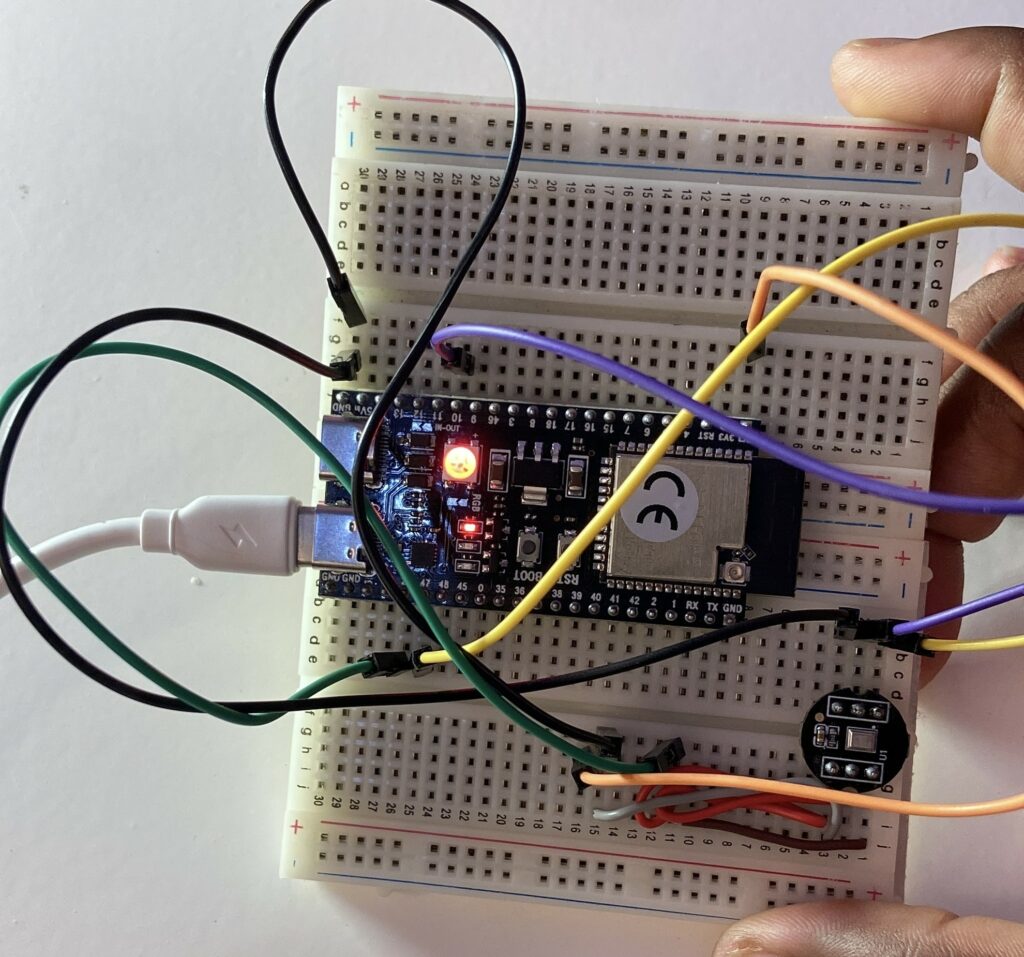
Greetings from my most recent microcontroller project! In this post, I’ll demonstrate how I used an ESP32 and an INMP441 digital I2S microphone module to create an audio-reactive lighting system that transforms a simple snap of your fingers into a dynamic RGB light show.
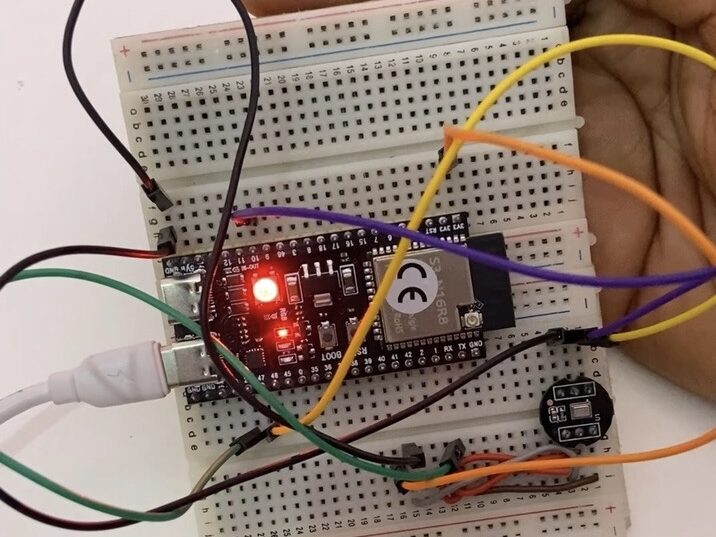
View the Video
For written instructions, continue reading this page, or watch the video guide.
Required Components & Wiring Pinout
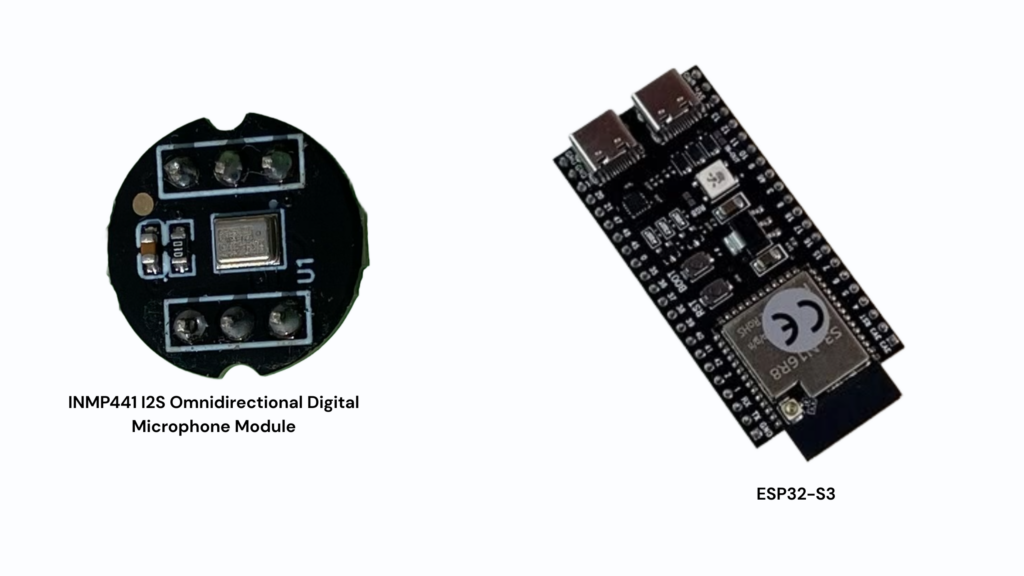
- INMP441 I2S Omnidirectional Digital Microphone Module
- ESP32-S3
How SnapSwitch Works: I2S Sound Detection
The INMP441 is an omnidirectional, digital-output, low-power, high-performance MEMS microphone with a bottom port. A MEMS sensor, signal conditioning, an analog-to-digital converter, anti-aliasing filters, power management, and an industry-standard 24-bit I2S interface make up the entire INMP441 system. Without the requirement for an audio codec in the system, the INMP441 can connect directly to digital processors like DSPs and microcontrollers thanks to the I2S interface.
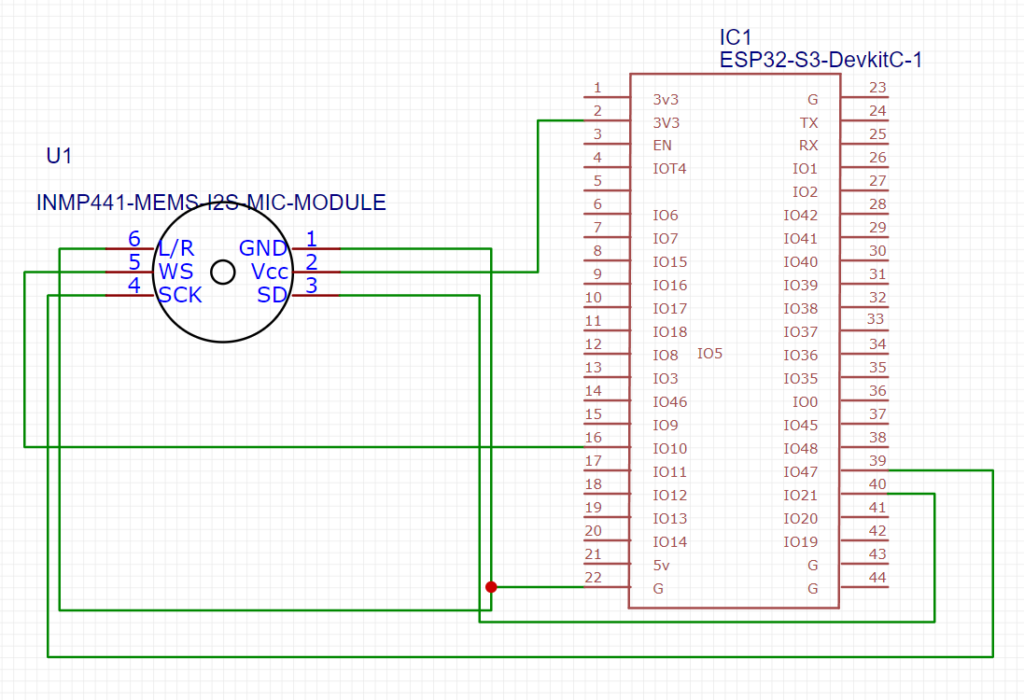
INMP441 pinout
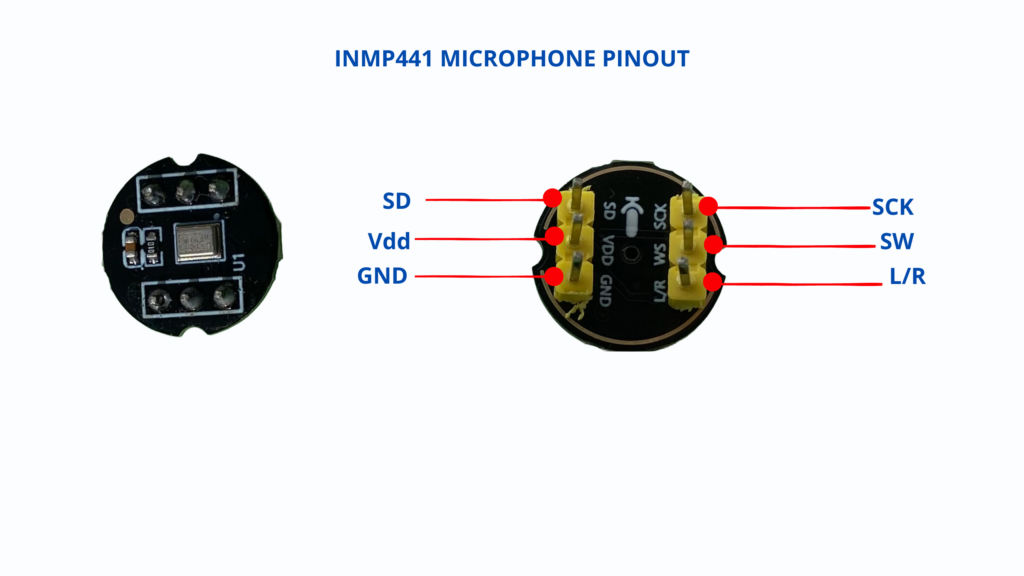
ESP32 to INMP441 Microphone Connections
Arduino C++ Code Setup
#include <driver/i2s.h>
#include <Arduino.h>
#include <Adafruit_NeoPixel.h>

// --- I2S Microphone Pin Definitions ---
#define I2S_BCLK_MIC 47  // SCK
#define I2S_LRC_MIC  10  // WS
#define I2S_DIN_MIC  21  // SD
#define I2S_SD_SPK   4   // Speaker DAC shutdown pin
#define I2S_MIC_PORT I2S_NUM_0

// --- NeoPixel Setup ---
#define LED_PIN     48   // NeoPixel GPIO
#define NUM_PIXELS  1    // Built-in single RGB pixel

Adafruit_NeoPixel pixels(NUM_PIXELS, LED_PIN, NEO_GRB + NEO_KHZ800);

// --- Audio & State Variables ---
#define SAMPLE_BUFFER_SIZE 512
#define SAMPLE_RATE        16000

const int soundThreshold = 2500;       // Adjust based on room noise
unsigned long lastTriggerTime = 0;     // Timestamp for snap debouncing
const unsigned long cooldownMs = 400;  // Debounce cooldown in milliseconds

// State Variables
bool isAnimating = false;              // Toggle: false = OFF, true = Playing RGB cycle
int colorIndex = 0;                    // Tracks current active color (0 = Red, 1 = Green, 2 = Blue)
unsigned long lastColorChange = 0;     // Timestamp for color animation loop
const unsigned long colorInterval = 300; // Time in ms before shifting to the next color

int16_t raw_samples[SAMPLE_BUFFER_SIZE];

// --- I2S Configuration ---
i2s_config_t i2s_config = {
    .mode = (i2s_mode_t)(I2S_MODE_MASTER | I2S_MODE_RX),
    .sample_rate = SAMPLE_RATE,
    .bits_per_sample = I2S_BITS_PER_SAMPLE_16BIT,
    .channel_format = I2S_CHANNEL_FMT_ONLY_LEFT,
    .communication_format = I2S_COMM_FORMAT_I2S_MSB,
    .intr_alloc_flags = ESP_INTR_FLAG_LEVEL1,
    .dma_buf_count = 4,
    .dma_buf_len = 1024,
    .use_apll = false,
    .tx_desc_auto_clear = false,
    .fixed_mclk = 0
};

i2s_pin_config_t i2s_mic_pins = {
    .bck_io_num = I2S_BCLK_MIC,
    .ws_io_num = I2S_LRC_MIC,
    .data_out_num = I2S_PIN_NO_CHANGE,
    .data_in_num = I2S_DIN_MIC
};

// Handles smooth non-blocking RGB color rotation
void handleRGBAnimation() {
  if (!isAnimating) {
    pixels.setPixelColor(0, pixels.Color(0, 0, 0)); // Turn OFF
    pixels.show();
    return;
  }

  // Check if it's time to change color based on colorInterval
  unsigned long currentMillis = millis();
  if (currentMillis - lastColorChange >= colorInterval) {
    lastColorChange = currentMillis;

    switch (colorIndex) {
      case 0: // RED
        pixels.setPixelColor(0, pixels.Color(255, 0, 0));
        break;
      case 1: // GREEN
        pixels.setPixelColor(0, pixels.Color(0, 255, 0));
        break;
      case 2: // BLUE
        pixels.setPixelColor(0, pixels.Color(0, 0, 255));
        break;
    }
    pixels.show();

    // Advance to next color
    colorIndex = (colorIndex + 1) % 3;
  }
}

void setup() {
  Serial.begin(115200);

  // Initialize NeoPixel
  pixels.begin();
  pixels.setBrightness(50);
  pixels.show(); // Ensure off at start

  // Initialize I2S Audio Driver
  if (i2s_driver_install(I2S_MIC_PORT, &i2s_config, 0, NULL) != ESP_OK) {
    Serial.println("I2S driver installation failed!");
    while(1);
  }

  if (i2s_set_pin(I2S_MIC_PORT, &i2s_mic_pins) != ESP_OK) {
    Serial.println("I2S pin configuration failed!");
    while(1);
  }

  // Disable Speaker DAC pin if defined
  pinMode(I2S_SD_SPK, OUTPUT);
  digitalWrite(I2S_SD_SPK, LOW);

  Serial.println("ESP32 Sound Animation Switch Started");
}

void loop() {
  size_t bytes_read = 0;

  // Read raw audio from I2S DMA
  esp_err_t result = i2s_read(I2S_MIC_PORT, raw_samples, sizeof(int16_t) * SAMPLE_BUFFER_SIZE, &bytes_read, portMAX_DELAY);

  if (result == ESP_OK && bytes_read > 0) {
    int samples_read = bytes_read / sizeof(int16_t);
    int maxIntensity = 0;

    // Find peak sound amplitude in current buffer
    for (int i = 0; i < samples_read; i++) {
      int soundIntensity = abs(raw_samples[i]);
      if (soundIntensity > maxIntensity) {
        maxIntensity = soundIntensity;
      }
    }

    // Toggle mode on snap/clap
    unsigned long currentTime = millis();
    if (maxIntensity > soundThreshold && (currentTime - lastTriggerTime > cooldownMs)) {
      isAnimating = !isAnimating; // Toggle animation ON/OFF
      colorIndex = 0;            // Reset color sequence back to RED
      lastTriggerTime = currentTime;

      Serial.print("Snap detected! Animation is now: ");
      Serial.println(isAnimating ? "RUNNING" : "OFF");
    }

  } else if (result != ESP_OK) {
    Serial.println("Failed to read from I2S");
    delay(1000);
  }

  // Continually handle light update step
  handleRGBAnimation();
}
How it works?
To detect peak sound strength in real time, the ESP32 continuously samples raw audio data from the INMP441 microphone via the I2S bus.
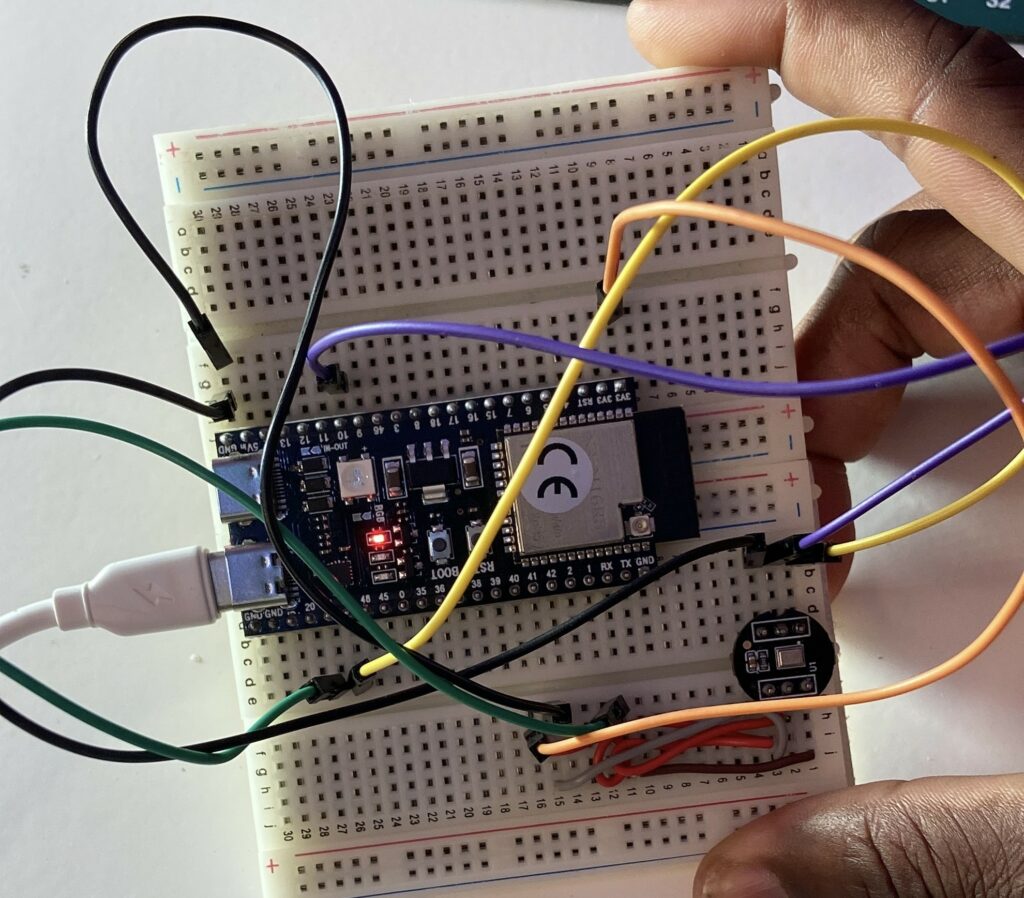
It functions as a toggle switch that continuously cycles through the colors Red, Green, and Blue when a snap or loud sound exceeds the predetermined volume level. The LED is turned off entirely on the subsequent snap.